Brandon Clark · Forward Progress

ONE SYSTEM.
EVERY AI.
THE RIGHT TASK, READY NEXT.

The 38X AI Assembly Line is a personalized operating system for people using Claude, ChatGPT, Codex, and Grok. One folder of truth, one dashboard, one button that tells you what's next.

Get the Guided Setup See it in action
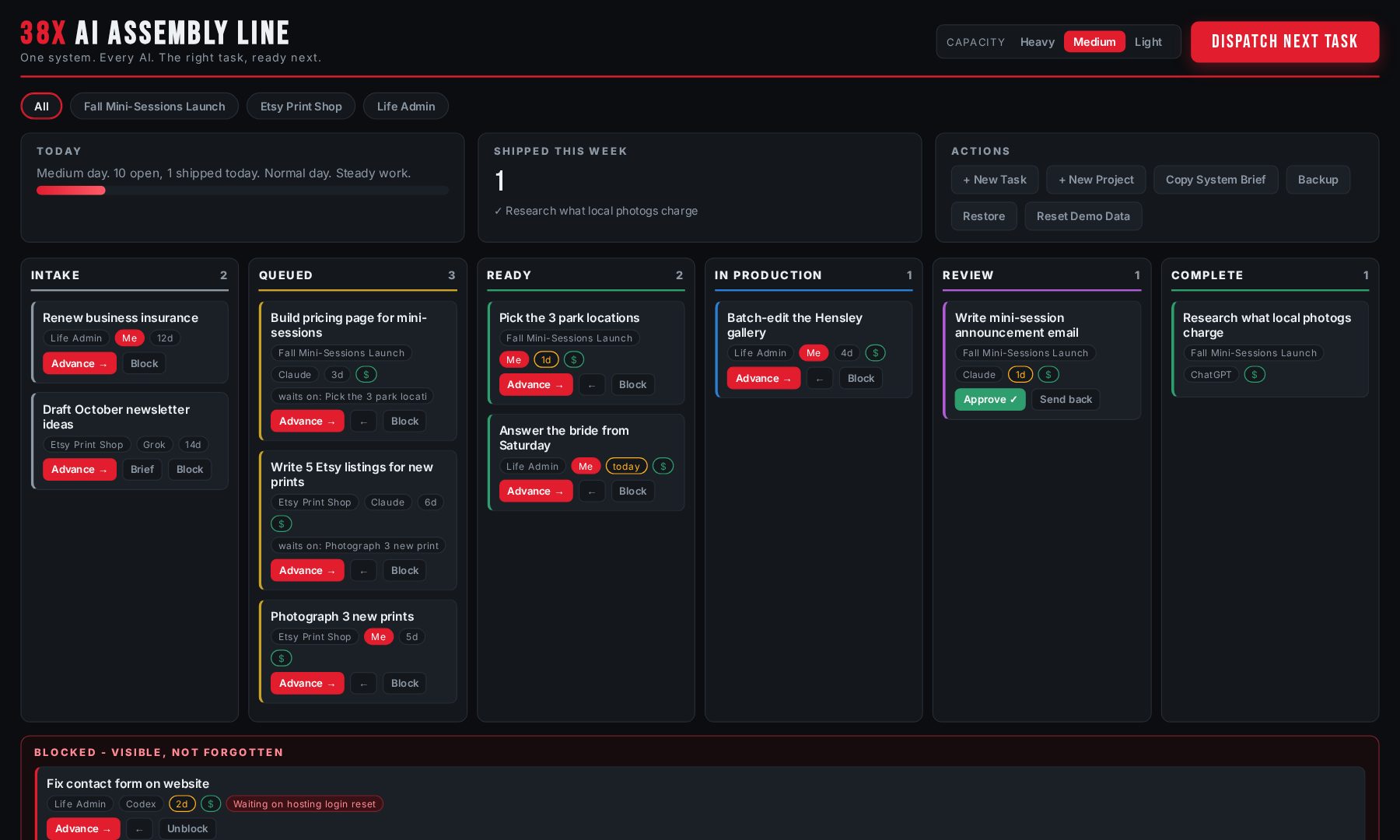
The 38X Assembly Line dashboard: six-stage board with project tabs, capacity selector, and the Dispatch Next Task button
The actual dashboard you get. One HTML file, no install, no account, no subscription.

YOUR PROBLEM ISN'T THE AI

You've got Claude in one tab.

ChatGPT in another.

Maybe Codex building something. Maybe Grok open on X.


Each one is brilliant. None of them knows what the others are doing. None of them remembers yesterday.

So your projects live in ten chats, your tasks live in your head, and you spend half your day re-explaining your own business to software you already pay for.


The tools aren't the problem. The missing piece is a shared source of truth and a line that feeds them work.

WHAT CHANGES WITH A SYSTEM

You sit down, open one dashboard, and press one button: DISPATCH NEXT TASK. It weighs what's urgent, what's important, what's blocked, what pays, and what kind of day you're having, then hands the right task to the right worker. Sometimes that's you. Usually it's an AI.

Your context lives in files, not in chat history. File-capable AI works straight from the folder. Browser AI gets a generated handoff brief you paste in. Every tool stays on the same page because the page actually exists.

I spent over 100 days building an AI headquarters for my own life and businesses. Most of what I built turned out to be bloat. This is the simple assembly line that survived, cleaned up so you can run it yourself.

HOW IT WORKS

01One folder of truth

Your context, projects, decisions, and inbox live as plain files. Local, or synced through OneDrive, Dropbox, or Google Drive. You own everything.

02One dashboard

A single local file. No account, no subscription, no server. Your work moves through an assembly line: Intake, Queued, Ready, In Production, Review, Complete.

03Dispatch

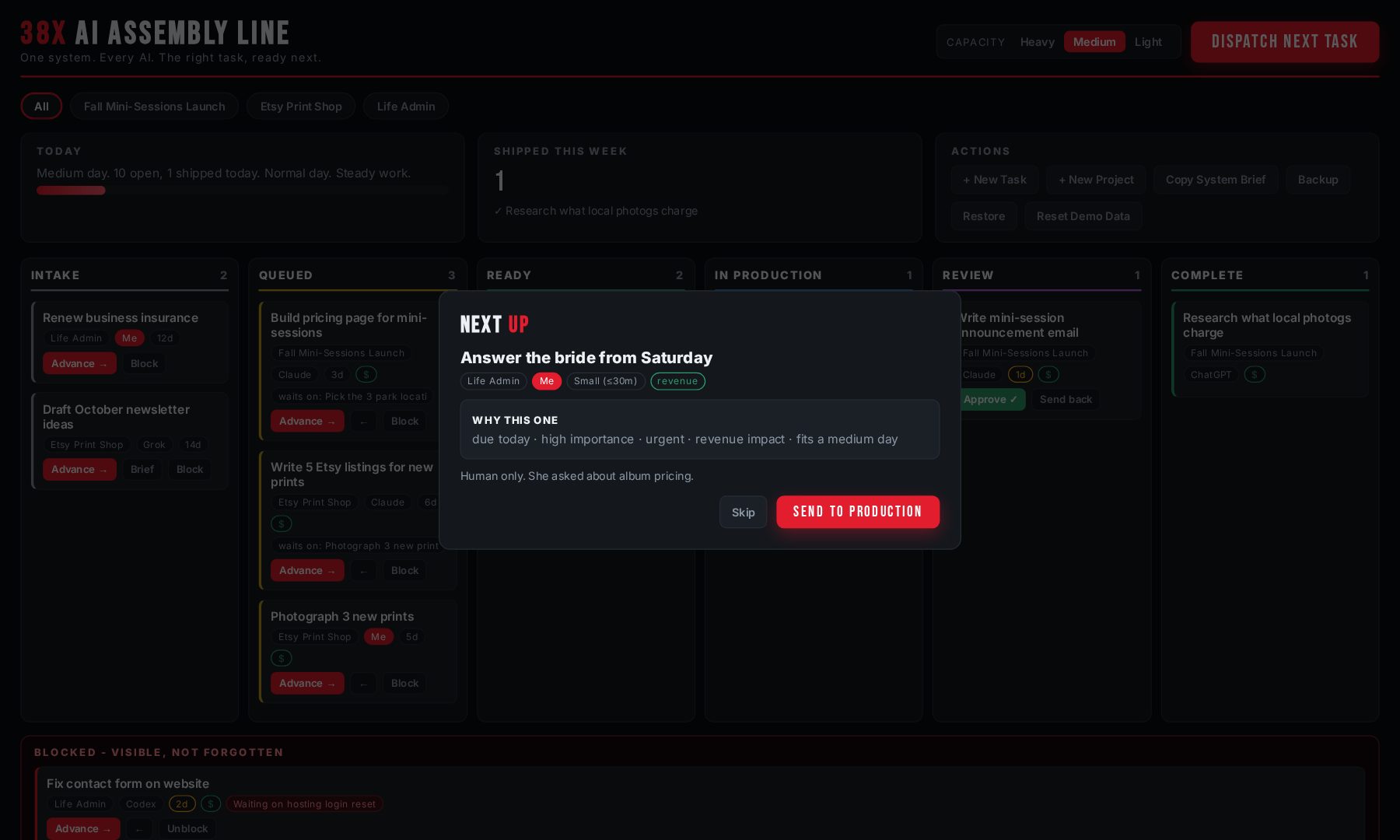
One button picks the next task using urgency, importance, due dates, dependencies, revenue impact, and your capacity today. It shows you why.

04Every AI, one brain

Claude and other file-capable tools read the folder directly. ChatGPT and Grok get an auto-generated handoff brief. Nothing gets re-explained twice.

THE LINE IN MOTION

Watch a task travel. Human review is built in: nothing ships without an Approve click. You stay the editor-in-chief; the machine does the hauling.

WHAT IT ACTUALLY DOES

Real screenshots from the system you download. The example data ships with it so you learn by clicking.

The one button

DISPATCH NEXT TASK

Stop deciding what to work on. One press weighs everything on your board and hands you the right next move, with the reasoning printed right on the card.

  • Scores urgency, importance, due dates, and revenue impact
  • Respects dependencies: blocked work never gets dispatched
  • Shows WHY it picked this one, every time
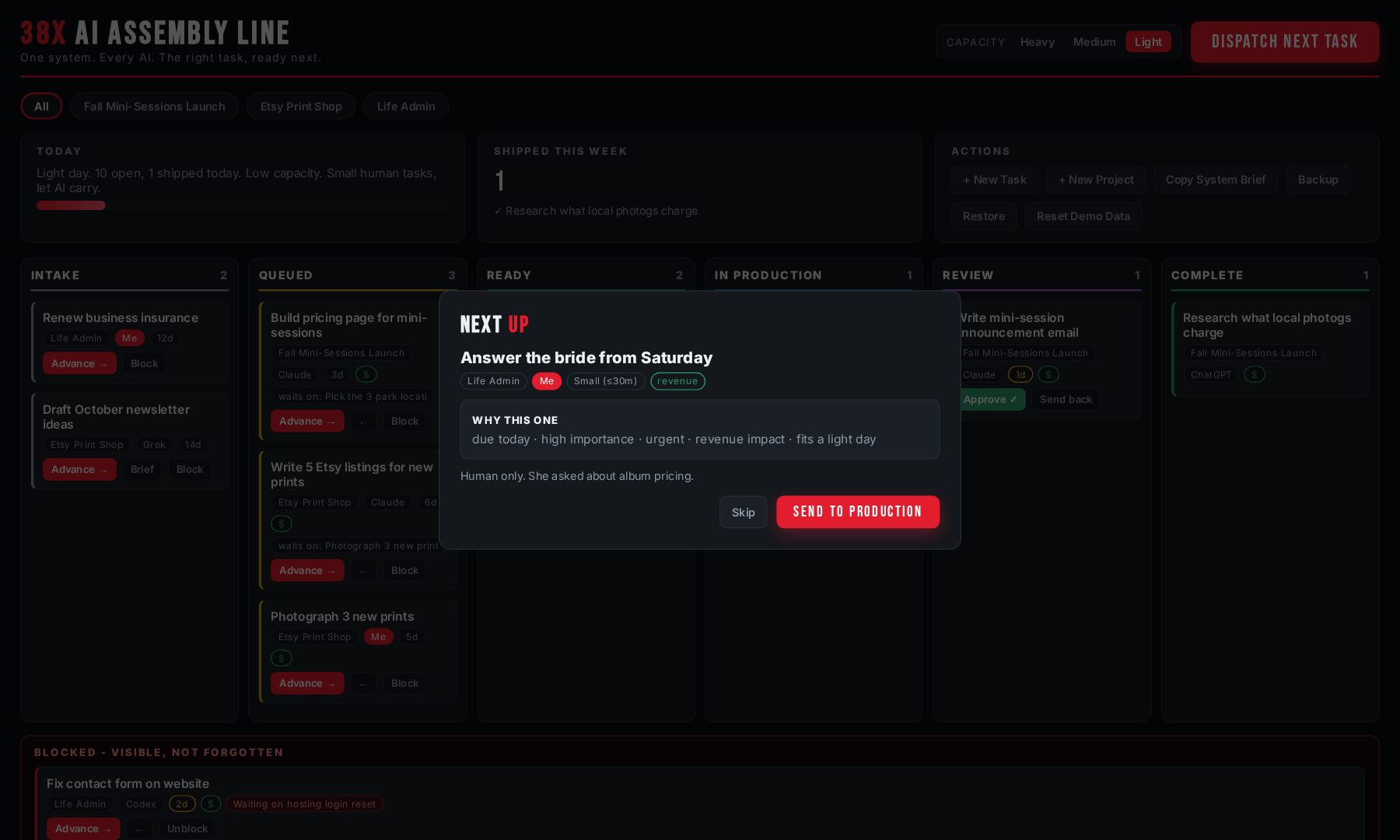
  • Skip it and it instantly offers the next best thing
Dispatch modal recommending the next task with the reasons why
Built for real life

IT ASKS WHAT KIND OF DAY YOU'RE HAVING

Heavy, medium, or light: you tell the system your honest capacity and it plans around the day you actually have. I built this living with chronic pain. A system that only works on your best day is not a system.

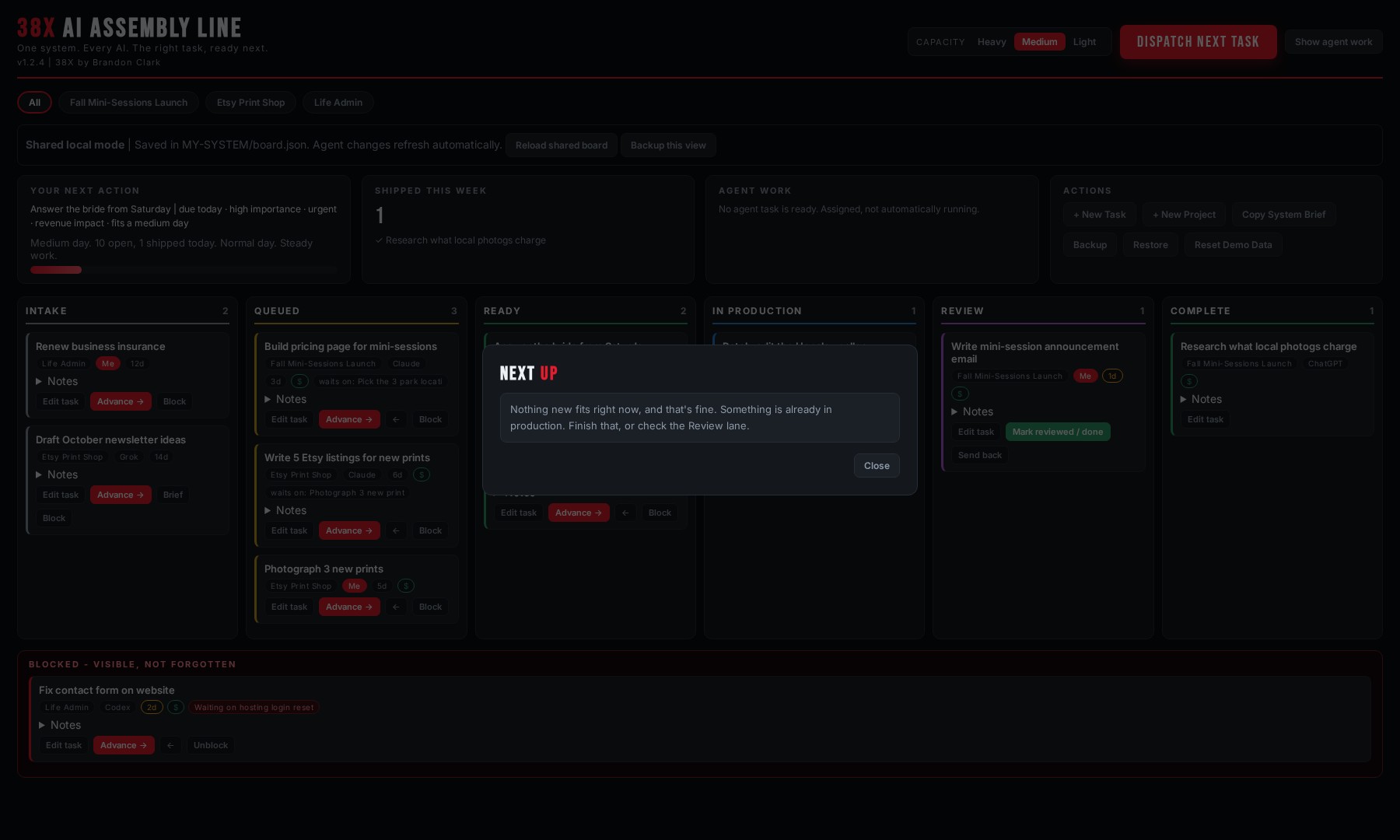
  • Light day? It stops handing you big tasks entirely
  • Your AI-owned tasks stay eligible: the machine carries more so you carry less
  • Rename the levels to your own words in one config line
Capacity set to Light: Dispatch recommends only a small task that fits the day
Every project, one line

PROJECT TABS, LIKE A STACK OF TRELLO BOARDS

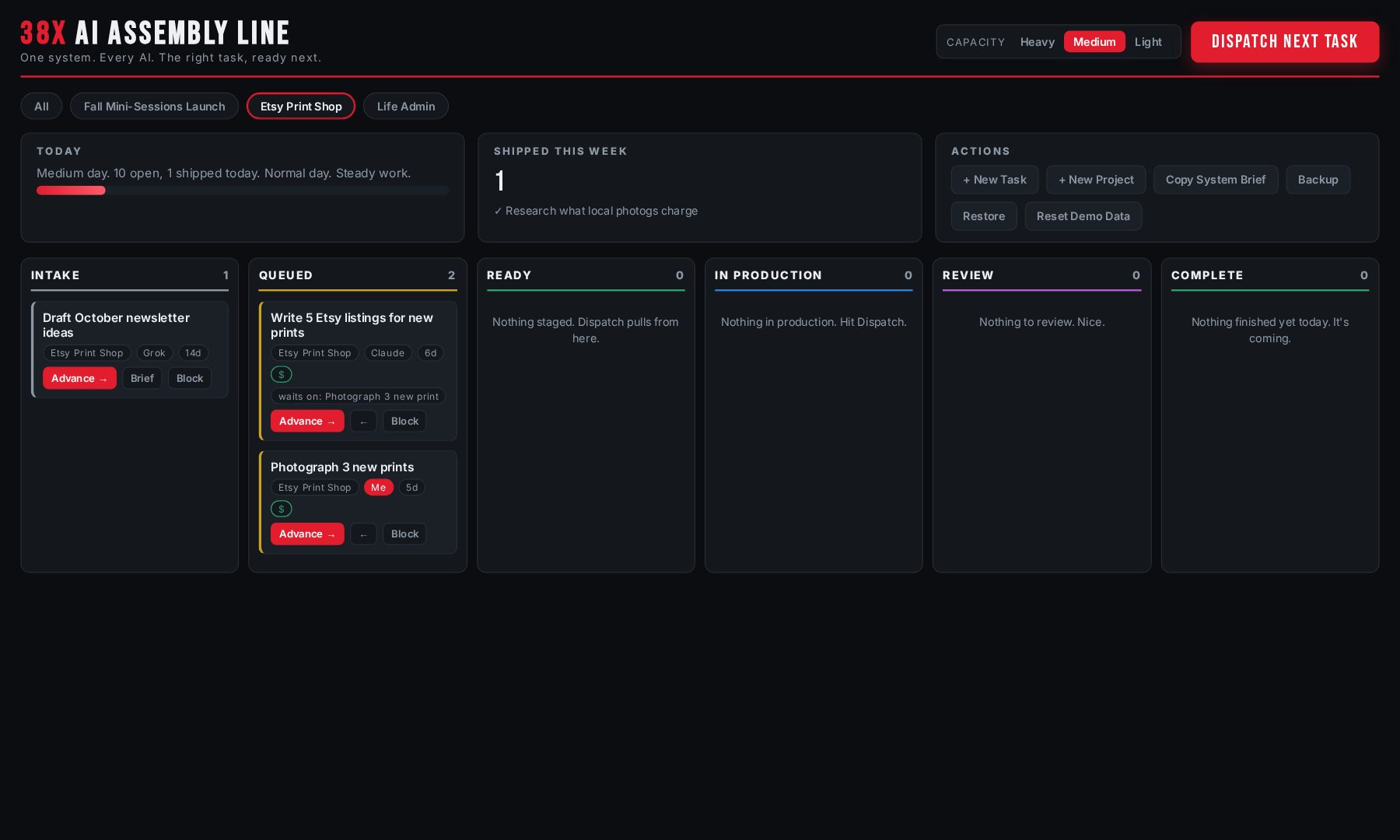
Each project gets its own tab. Click one and the whole line narrows to just that project: the lanes, the blocked list, even Dispatch. Click All and you're back to the bird's eye view.

  • New project = new tab, instantly
  • Tasks flow through six stages: Intake, Queued, Ready, In Production, Review, Complete
  • Blocked work sits in its own strip: visible, never forgotten
Project tab selected, showing only that project's tasks across the assembly line
The honest multi-AI fix

HANDOFF BRIEFS FOR BROWSER AI

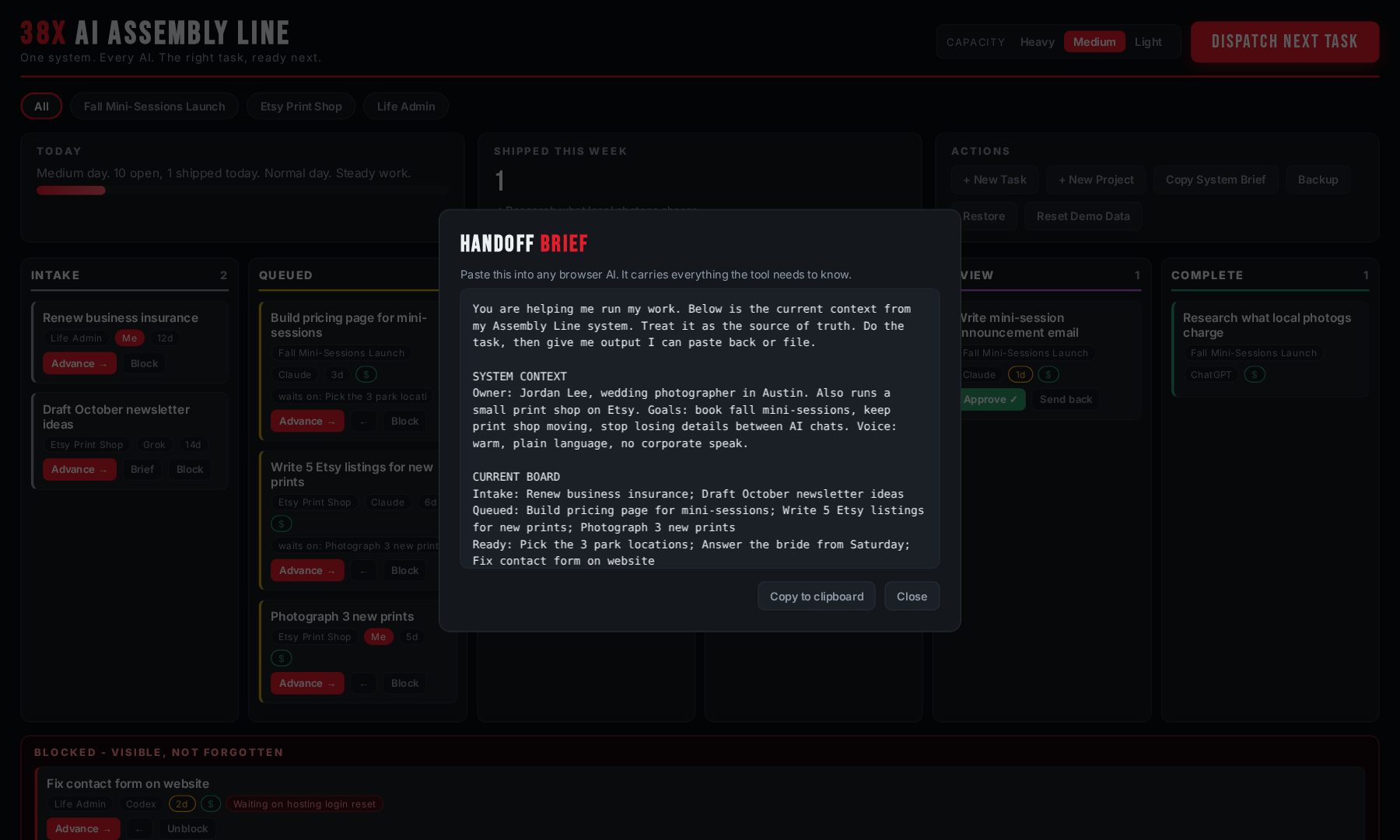
ChatGPT and Grok can't read your files. Nobody's tools magically share memory, whatever the gurus say. So the dashboard generates a complete context brief you paste into any browser AI: who you are, the project, the task, what done looks like.

  • One click, one paste, full context in 10 seconds
  • File-capable AI (Claude, Codex, Cursor) skips this and reads the folder directly
  • Update your context once, every future brief carries it
Generated handoff brief ready to copy into a browser AI
The part nobody expects

YOUR AI BUILDS YOUR BOARD FOR YOU

You don't type your projects in by hand. The kit includes interview prompts: paste one into your AI, answer its questions honestly, and it builds your entire board: projects, tasks, owners, priorities, due dates.

  • Works with file-capable AI and browser AI, both paths included
  • Daily driver prompts too: morning kickoff, brain-dump sorting, weekly review
  • A first-week plan so the system sticks instead of dying on day three
AUTO-SETUP INTERVIEW
AI: What are your 2 to 5 active projects right now?
You: My freelance clients, the Etsy shop, and honestly my house renovation...
AI: For the Etsy shop, what are the next 3 concrete tasks, and which truly need YOUR hands?
You: Photograph the new prints. That one's me.
AI: Got it. Building your board now. Hit Reset and it loads.

WHAT A DAY LOOKS LIKE

  1. Morning: open the dashboard, set your honest capacity, press Dispatch. Your first task is chosen and explained before your coffee's done.
  2. Fire off the agents: run the morning kickoff prompt. Your AI lists what IT should work on today, grouped by tool, and gets moving.
  3. Work the line: you do the human tasks. Agents do theirs. Cards move through the stages as things finish.
  4. Review gate: AI work lands in Review. Nothing ships without your Approve click. You stay editor-in-chief.
  5. Shipped: the tracker counts what actually got done today and this week. Momentum you can see.

WHY YOU CAN TRUST IT

A business owner currently pays me every month to learn this exact system for his own company. This page exists because he told me other people would pay for it too.The origin
An 8-figure ecommerce founder watched me drive it and couldn't believe it wasn't already a product. No quote, no name, just what happened.The reaction
This launch you're looking at, the page, the checkout, the content plan, was run through this exact system, with my AI agents working the same board I'm selling you.The receipts

WHAT'S IN THE BOX

No subscription. No account. No data leaves your machine. It's your folder.

THE GUIDED SETUP, EXPLAINED

The DIY kit works. But the fastest version of this is the two of us on a screen share wiring it into your actual life.

Before the call you fill out a short questionnaire. I build your starting configuration before we ever meet: your storage choice, your terminology, your AI tools mapped to roles.

Then 60 minutes together: install, connect your folder, launch your dashboard, build your first real project, dispatch your first real task and ride it through the line, connect your file-capable AI, and run one browser-AI handoff so you've done the full loop yourself before we hang up.

You get a short installation-fix window after the call in case anything in the setup misbehaves on your machine. It's a setup service, not unlimited coaching; deeper work and future calls are separate and I'll always be straight with you about which is which.

THREE WAYS IN

DIY SYSTEM

one-time, yours forever
  • Complete system + dashboard
  • Example projects and tasks
  • Setup + customization guides
  • Multi-AI operating instructions
  • Handoff method for browser AI
  • Windows and Mac
Get the kit
Most people should pick this

GUIDED PERSONAL SETUP

  • Everything in the DIY kit
  • Pre-call questionnaire + your config built before we meet
  • 60-minute 1-on-1 install and setup call
  • Your first project and first dispatched task, done live
  • Your AI tools connected, roles assigned
  • Browser-AI handoff demonstrated on your real work
  • Installation-fix window after the call
Book my setup

PRIVATE 30-DAY BUILDOUT

application only
  • Architecture session
  • Customized system + dashboard
  • Agent roles + instructions written for your business
  • Weekly calls, bounded async support
  • Final handoff
Apply

Complex or fully done-for-you builds get a custom quote after the application. I'd rather tell you the real scope up front than surprise you later.

QUESTIONS, ANSWERED STRAIGHT

Do all my AI tools magically share memory now?

No, and nobody's system does that. File-capable tools (Claude Desktop, Claude Code, Codex, Cursor) genuinely work from the shared folder. Browser tools (ChatGPT, Grok) can't see your files, so the dashboard generates a handoff brief you paste in. Ten seconds, full context. That's the honest version and it works.

I'm not technical. Can I run this?

If you can move a folder and double-click a file, yes. The dashboard is one HTML file; there's no install, no terminal, no account. The Guided Setup exists exactly for people who'd rather do it once, together, correctly.

Windows or Mac?

Both. Launchers and step-by-step guides for each are included, plus OneDrive, Dropbox, and Google Drive instructions if you want it synced across machines.

Which AI tools does it work with?

Any of them. It ships configured for Claude, Codex, ChatGPT, and Grok, and the config file lets you add or rename tools in one place. The system doesn't care which AI wins next year; it's files and a browser page.

Is there a subscription?

No. One-time purchase. The system is a folder you own. There's nothing for me to shut off.

What about my privacy?

Your data never touches my servers because there are no servers. Files stay on your machine or in your own cloud drive. The dashboard stores task state in your own browser. I never see it, and no analytics live inside the product. The only thing I ever receive is what you choose to put in the setup questionnaire, and I'll never ask for passwords or API keys.

What if it doesn't fit how I work?

Every label, stage, capacity word, and color is customizable from one config file. If you buy it and it truly isn't for you, reply to your receipt within 14 days and I'll refund the DIY kit. Guided Setup refunds any time before the call happens; after the call, the work is done and it's yours.

Why "38X"?

It's my brand. Bedridden in 2014, won a 200-mile ultra later, chronic pain every day since. I build systems that work on bad days, because I don't get to have only good ones. That philosophy is baked into this: capacity is a first-class input, not an afterthought.
READY WHEN YOU ARE

If you use more than one AI and you're tired of being their only shared memory, this is the fix. Pick your lane above, or start with the one most people should: the Guided Personal Setup.

Get the Guided Setup

FORWARD PROGRESS · BRANDON CLARK · ONE SYSTEM. EVERY AI. THE RIGHT TASK, READY NEXT.